FPS
Uncapped frame rate (260 instead of 120), minimal particles, smooth lighting off, OptiFine’s Fast Render and vertex buffers, and the “OptiLag FPS” profiles for Lunar and Badlion (Pro). Your render distance stays yours.
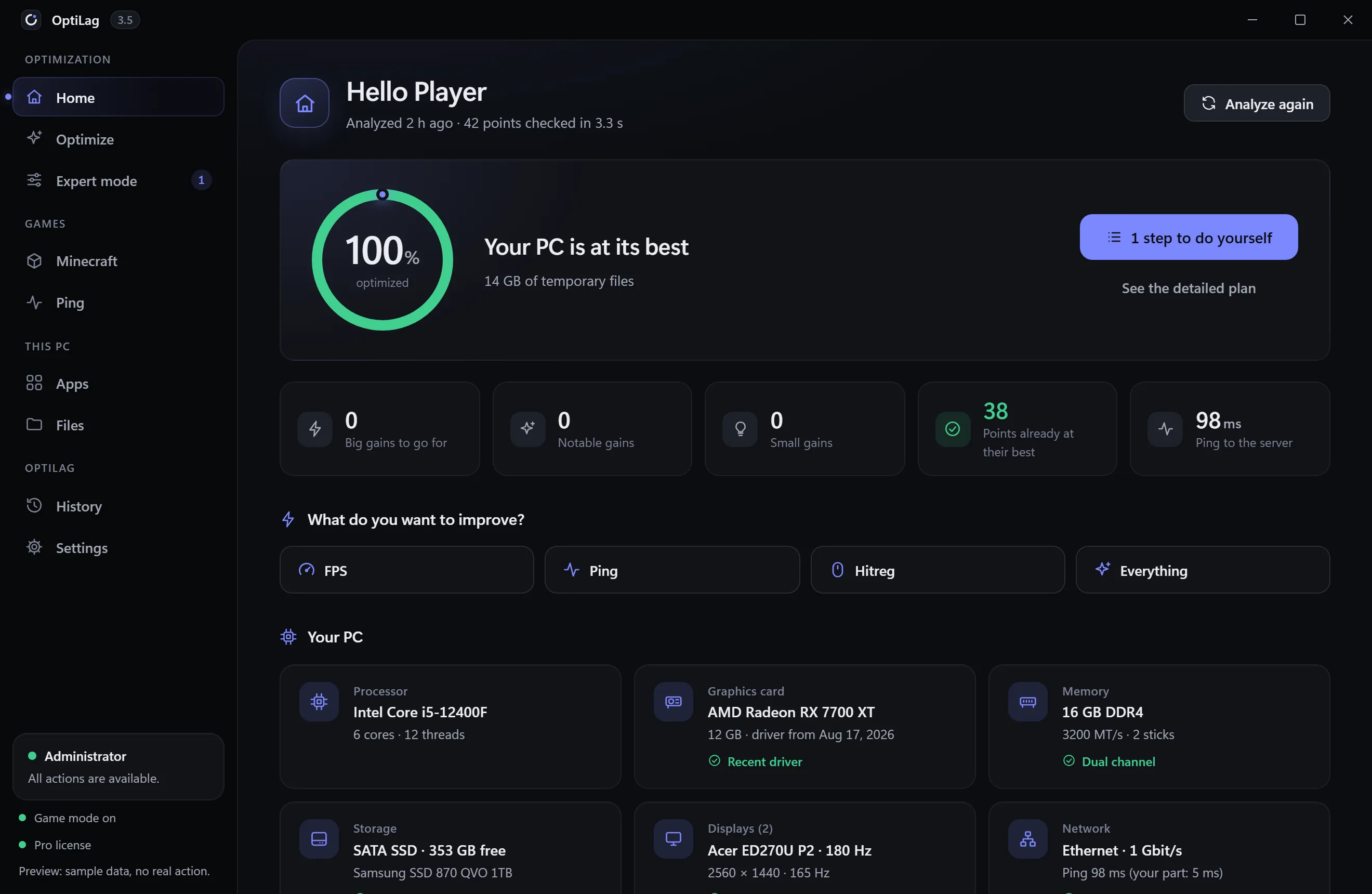
OptiLag scans your hardware and 127 Windows and Minecraft settings in a few seconds, then applies only what helps your goal: more FPS, a steadier ping or better hitreg on Hypixel. Every change is backed up before it’s applied and can be undone in one click.
Why OptiLag
Turning off Defender, forcing random network tweaks, promising +300 FPS: many optimizers do more harm than good. OptiLag reads first, always explains, and keeps what it needs to put everything back.
 OptiLag
Optimize
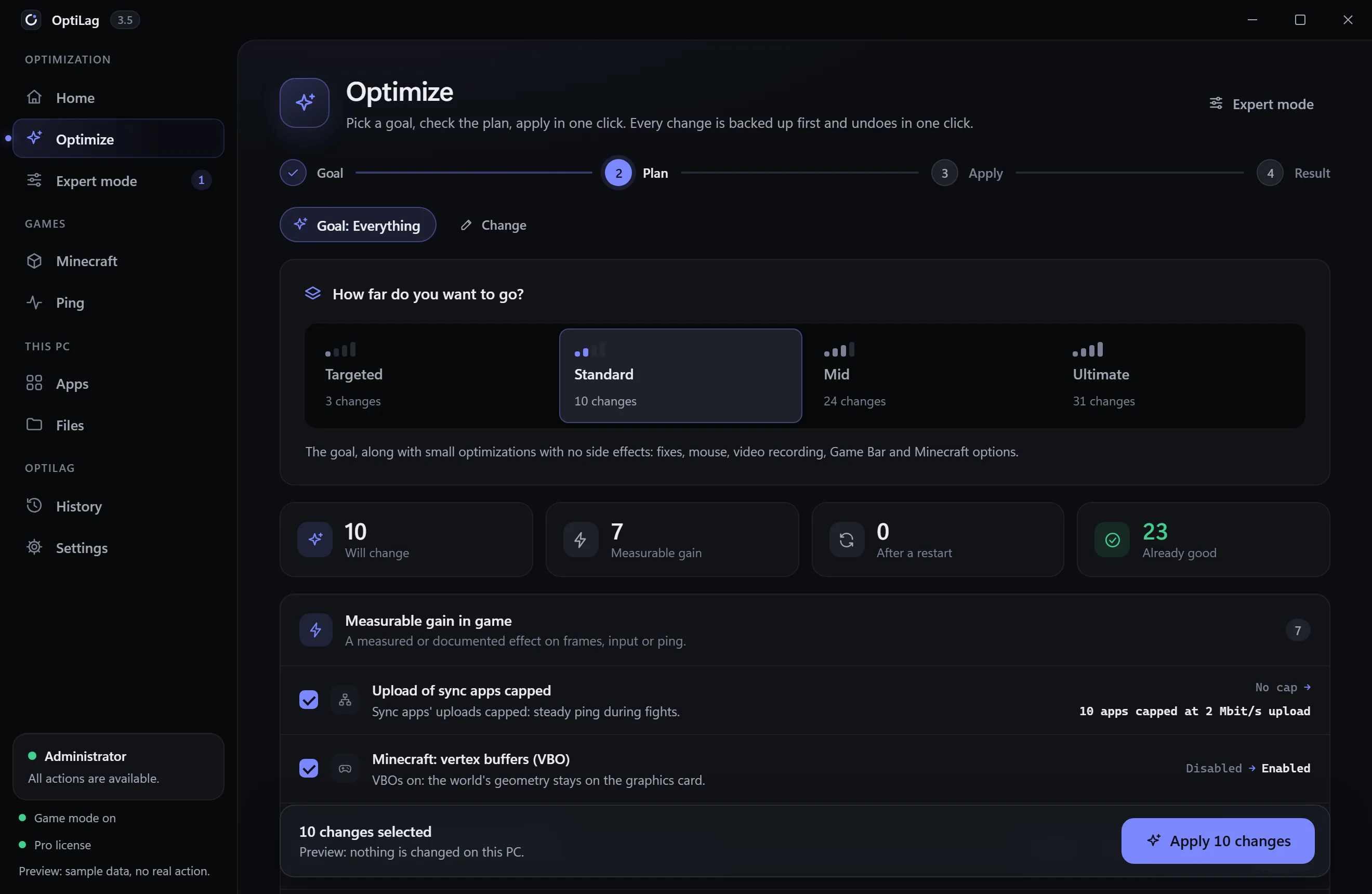
No list of tweaks to sort through: you say what you want to improve, OptiLag works out the plan for this PC, and you see every change before anything happens.
Prefer to choose every setting yourself? Expert mode lists all 127, with the reason for each one.
Minecraft and Hypixel
Every setting in these modes was checked against its sources: Hypixel’s rules, the game’s own code and measurements on a real PC. A lead without proof stays a tip, never a setting.
Uncapped frame rate (260 instead of 120), minimal particles, smooth lighting off, OptiFine’s Fast Render and vertex buffers, and the “OptiLag FPS” profiles for Lunar and Badlion (Pro). Your render distance stays yours.
No Wi-Fi network scans while you play, sync apps’ uploads capped, Ethernet card without interrupt moderation or power saving. Then a ping test to Hypixel, at rest and while your connection is busy.
Your hits land on what you see: true fullscreen, uncapped frame rate, VSync off, no mouse acceleration and a steady ping. What OptiLag can’t set stays a tip: a 500 to 1000 Hz mouse, a cable.
Knockback (computed by the server: reducing it is cheating), the “hit delay fix”, MouseDelayFix and any mod that changes how your hits are aimed or how the game talks to the server: Hypixel forbids them. Lowering your displayed ping isn’t possible either.
Scan
Before touching a single setting, OptiLag reads your hardware in detail. The biggest gain often isn’t in Windows.
A kit sold for 3200 MT/s running at 2133? OptiLag spots it from your memory sticks’ part number and tells you the key and the BIOS menu to turn on XMP or EXPO.
A 165 Hz monitor running at 60 Hz: OptiLag sets the right refresh rate and only keeps it if you confirm within 15 seconds.
On a laptop, Java is sent to the dedicated card rather than the integrated chip.
Drive health, SSD space, and the traces other optimizers left behind.
Minecraft
Lunar Client, Badlion or the official launcher: OptiLag gets the PC ready when you start a game, and puts everything back when you quit.
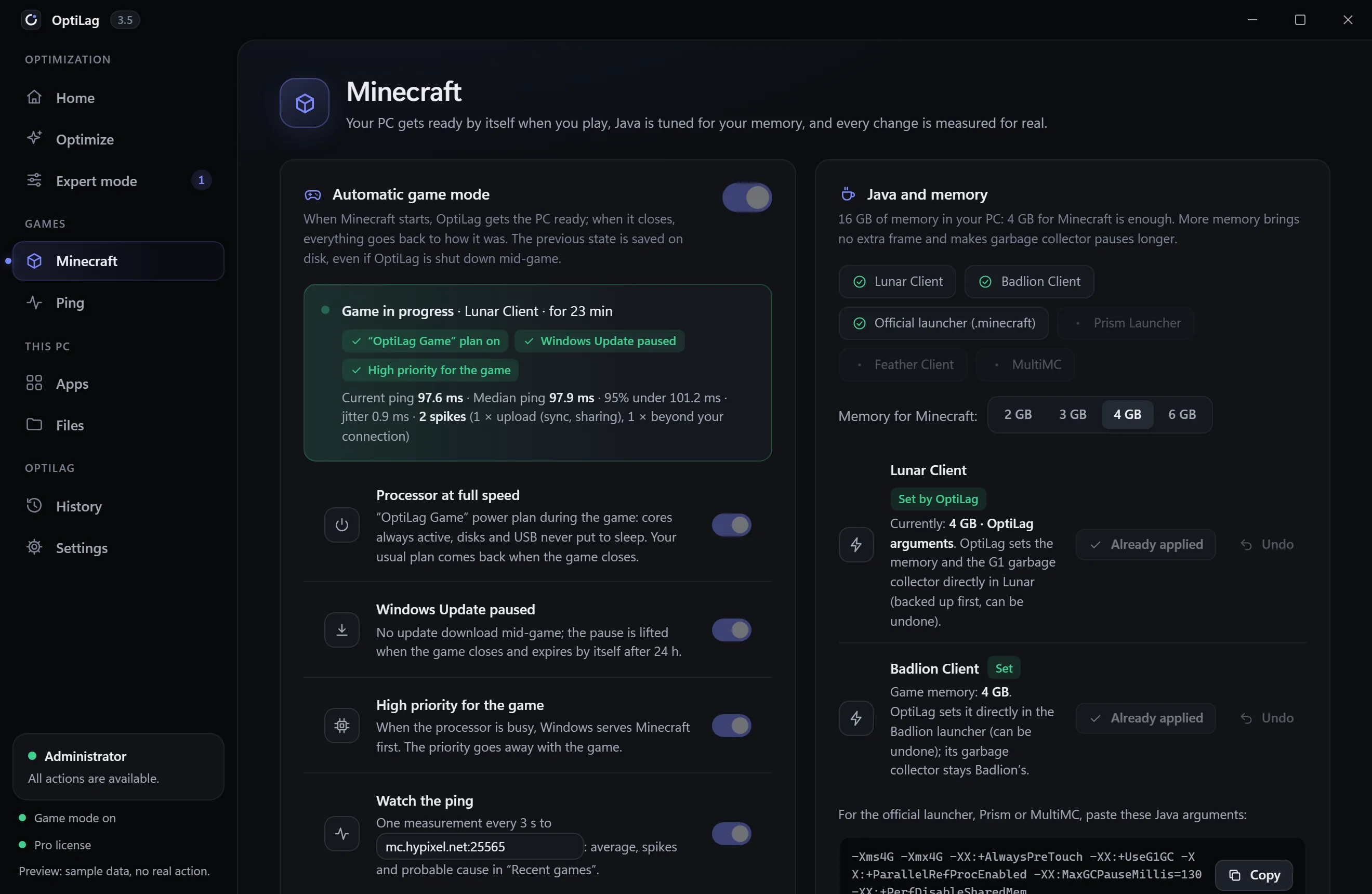
Gaming power plan, Windows Update paused, high priority and ping monitored during the game. Everything goes back to normal when the game closes.
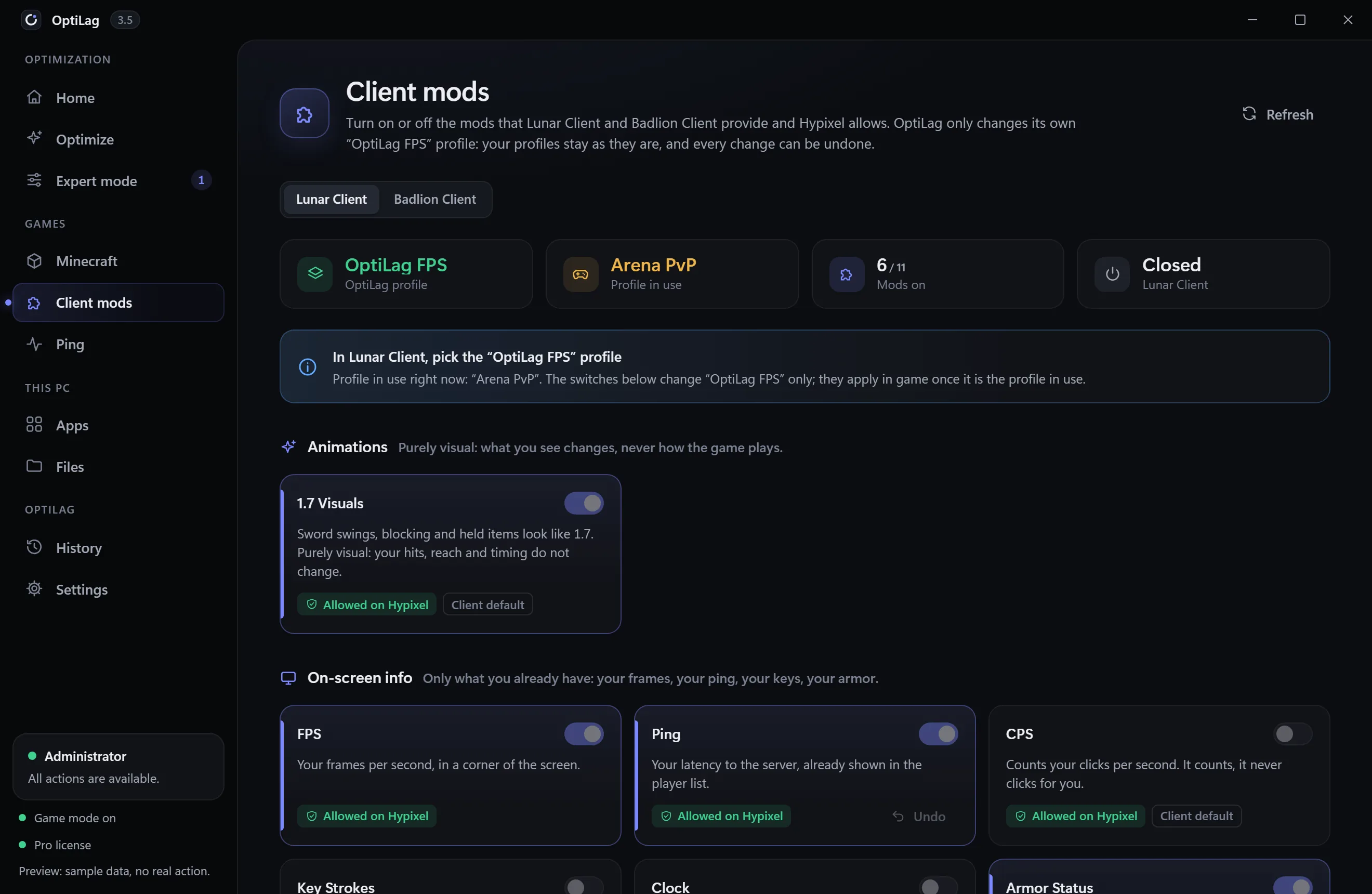
An “OptiLag FPS” profile added next to yours, never in their place: lazy chunk loading, unnecessary cosmetics and particles hidden, raw mouse input.
3 GB with 8 GB in the PC, 4 GB from 16 GB, G1 garbage collector. More memory doesn’t add a single frame and makes pauses longer.
options.txt and OptiFine rewritten line by line for the setting at hand, everything else copied byte for byte.
Before and after measurement with PresentMon, and an A/B/A/B lab that only keeps an effect if it beats the margin of error.
Nothing is written to the game’s files while it or its launcher is open: it would rewrite its settings when quitting.
Client mods New
Turn on or off, from OptiLag, the mods that Lunar Client and Badlion Client ship themselves. Nothing to download, nothing injected: OptiLag only changes its own “OptiLag FPS” profile, and your profiles stay as they are.
Left out on purpose, even though the clients offer them: reach display, hitboxes, freelook, minimap, other players’ stats, auto GG. Each one can get you banned or gives an edge Hypixel forbids.
In game New
A small OptiLag window above Minecraft: your clicks go through to the game and it never takes the focus. No DirectX or OpenGL hook, nothing in the game’s process.
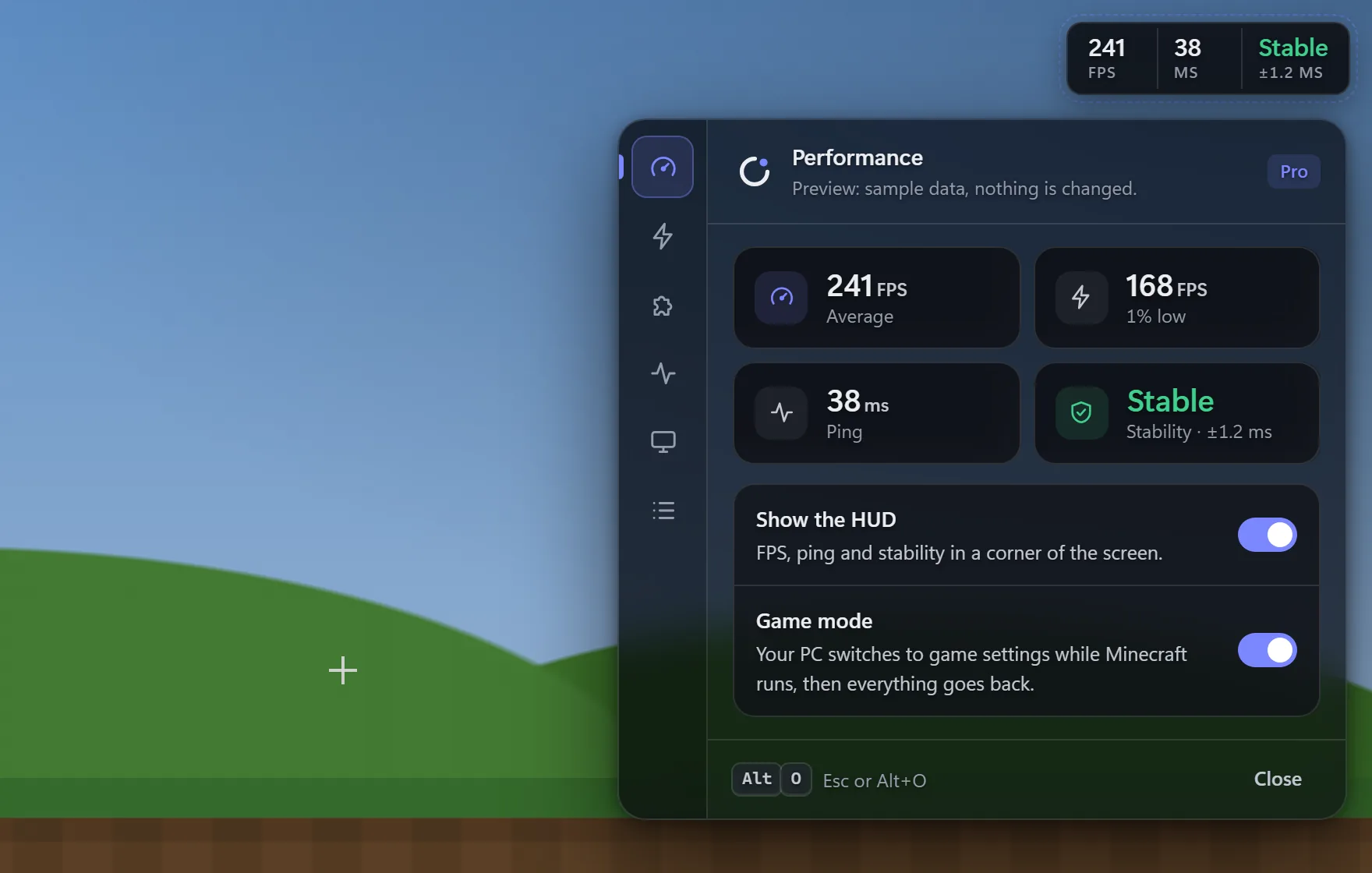
Play in borderless window to see the HUD and the panel: in exclusive fullscreen, Windows shows no other window over the game. Exclusive fullscreen still has the lowest display latency (Hitreg mode), so the choice is yours. FPS need OptiLag running as administrator; ping and stability work without it.
Bed Wars Coming soon
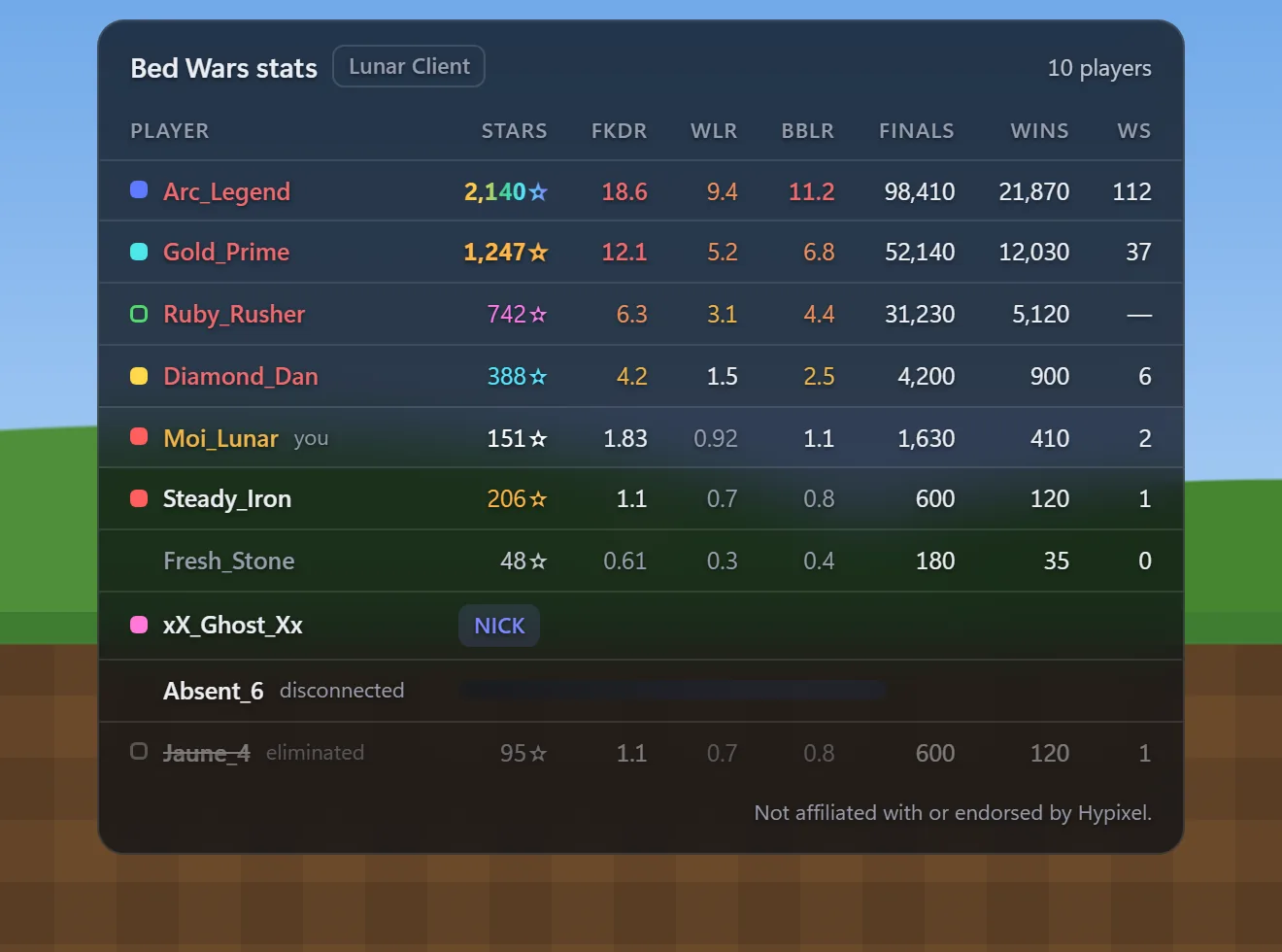
In a Bed Wars game, hold Tab: stars, FKDR, WLR, BBLR, finals, wins and win streak of every player, sorted by threat level. Read from the game’s own log and Hypixel’s public stats, in OptiLag’s window: no mod, nothing injected.
Coming soon for OptiLag subscribers: these stats wait for Hypixel’s approval of OptiLag’s application. No date yet. OptiLag is not affiliated with or endorsed by Hypixel.
Ping
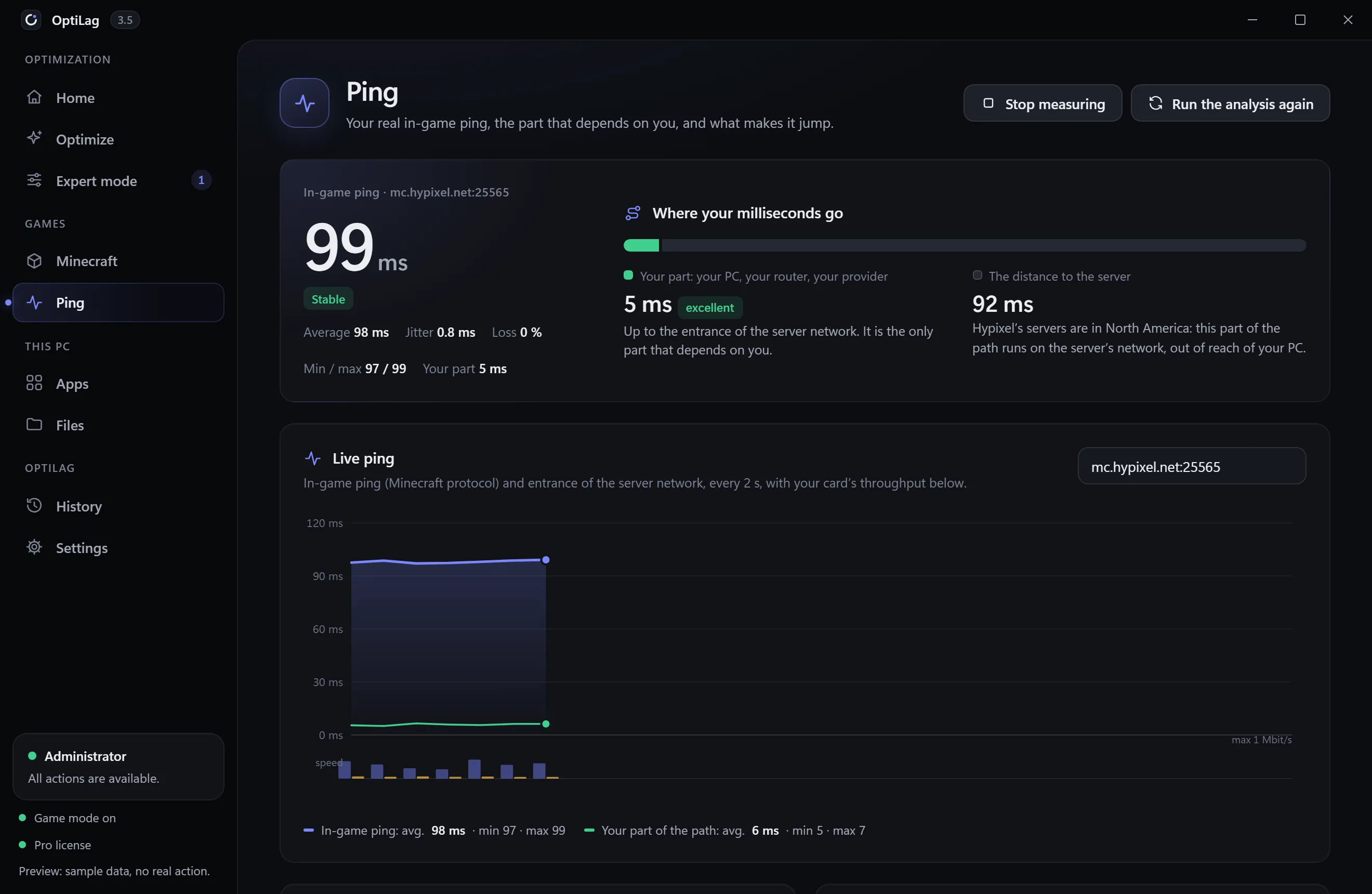
OptiLag measures your in-game ping with the Minecraft protocol, then splits it in two: your PC, your router and your internet provider on one side, the distance to the server on the other.
A relay only replaces your part of the route; the distance to the server stays the same. Your part is often just a few milliseconds: a relay would only add a detour. So OptiLag doesn’t sell one, it keeps your ping stable.
This PC
Nothing leaves your PC without your click, and what OptiLag suggests comes from lists it has checked.
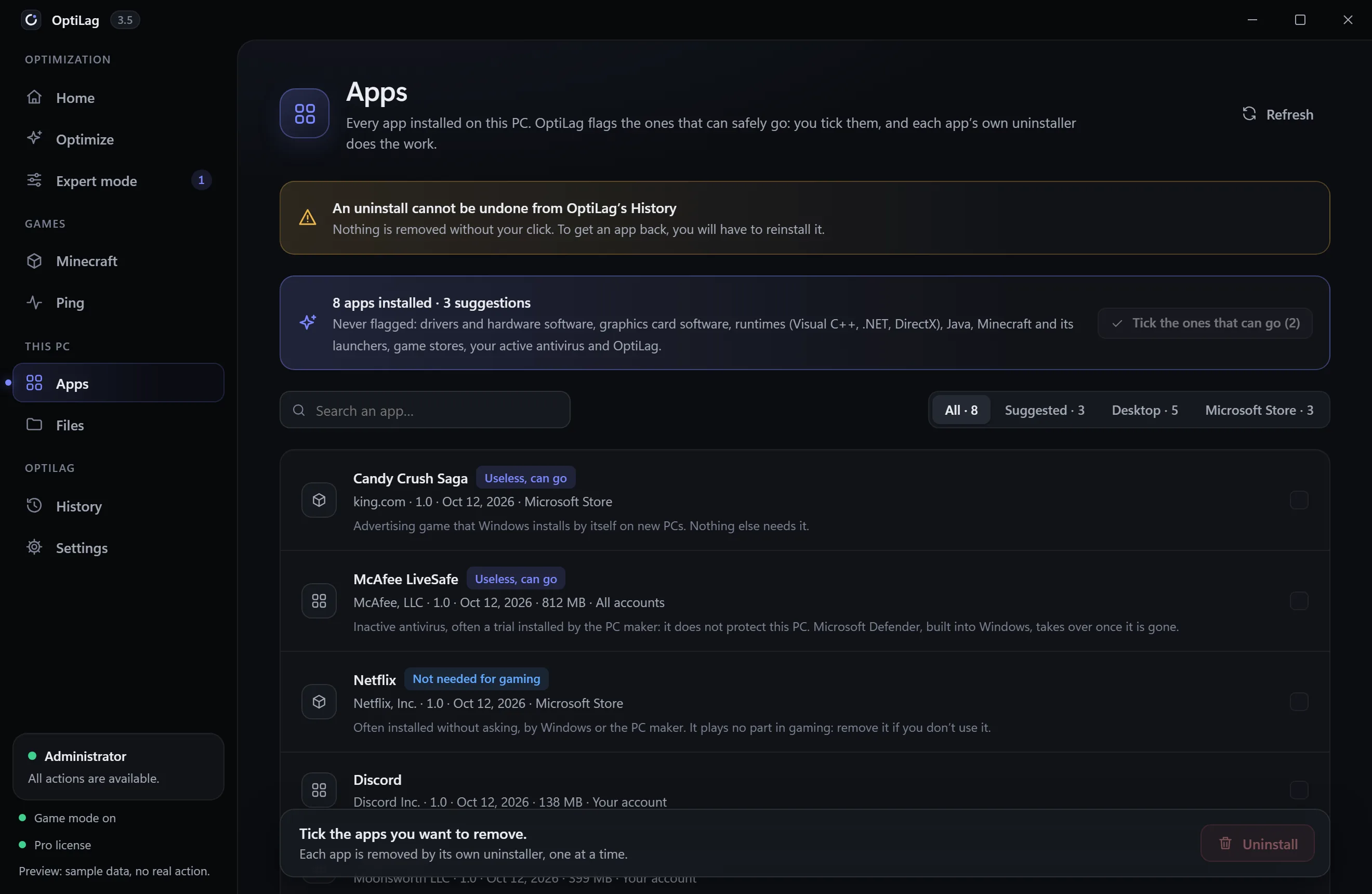
Every installed app, desktop and Microsoft Store. OptiLag flags the ones that can safely go; you tick them, and each app’s own uninstaller does the work. Never flagged: drivers, runtimes, Java, Minecraft and its launchers, game stores, your antivirus.
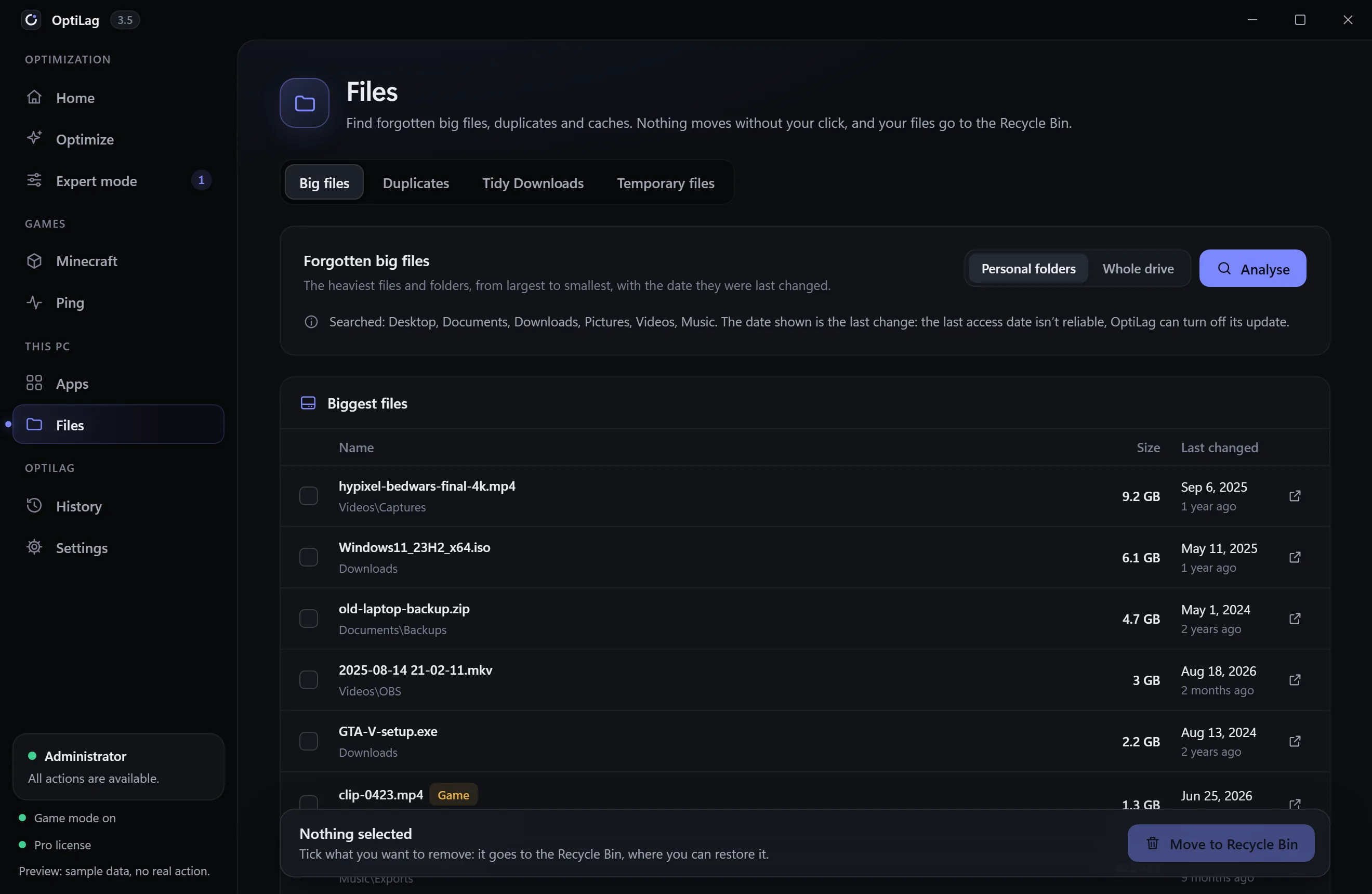
Forgotten big files, duplicates checked by their content, Downloads tidied by type, temporary files. Everything goes to the Recycle Bin: nothing is deleted for good.
Safety
These rules live in OptiLag’s engine, not just in the interface: neither a profile nor an undo can get around them.
Defender, SmartScreen, User Account Control, memory integrity, VBS and Spectre protections are never turned off.
A log entry, then a .reg export, then the value is read back. If the backup can’t be written, nothing is changed.
Nothing in the game’s memory or code, no cheat mod, nothing Hypixel forbids. The overlay is a separate window.
A failure keeps its backup, an undo is marked without erasing anything: you always know what changed.
Offered before your very first optimization, then available at any time from History.
Files go to the Recycle Bin; apps leave through their own uninstaller. No BIOS change, no formatting.
At every startup OptiLag checks for a new version and shows what’s new. Nothing installs until you click, and every update is checked against OptiLag’s signature.
The scan stays on your machine. The app only connects to check your license, fetch its signed settings and updates, and measure ping.
Pricing
No commitment, cancel anytime from your account. Paid yearly, the subscription costs 40% less.
To optimize your PC for your goal and keep it clean.
€5per month
€36per year
No commitment, cancel anytime
That’s €3 per month
Choose EssentialAll of OptiLag, to get the most out of your PC.
€10.99per month
€79per year
No commitment, cancel anytime
That’s €6.58 per month
Choose ProPrices include VAT. Card payment with Stripe. You can change plans or cancel at any time; cancellation takes effect at the end of the paid period.
| Feature | Essential | Pro |
|---|---|---|
| Optimize | ||
| PC scan, score and plan for your hardware | Yes | Yes |
| Hitreg, Ping and FPS modes | Yes | Yes |
| Targeted and Standard intensities | Yes | Yes |
| Mid and Ultimate intensities | —No | Yes |
| Privacy and clean Windows packs, startup apps, BIOS and display guides | Yes | Yes |
| Minecraft | ||
| Lunar and Badlion memory, game options | Yes | Yes |
| In-game panel: modes mid-game, ping test | Yes | Yes |
| In-game HUD: FPS, 1% low, ping | —No | Yes |
| Client mods (Lunar, Badlion) | —No | Yes |
| Automatic game mode | —No | Yes |
| “OptiLag FPS” profiles for Lunar and Badlion | —No | Yes |
| FPS measurement and A/B lab | —No | Yes |
| Bed Wars stats on Tab | Soon | Soon |
| Ping | ||
| Live ping, ping tests to the server | Yes | Yes |
| Route to the server, anti-spike | —No | Yes |
| This PC and OptiLag | ||
| Apps: safe suggestions, official uninstallers | Yes | Yes |
| Files: big files, duplicates, Downloads, temporary files | Yes | Yes |
| History, undo, restore point | Yes | Yes |
| Signed updates, offered at startup | Yes | Yes |
| Priority email support | —No | Yes |
FAQ
It depends on your PC, and OptiLag doesn’t promise a number. If your memory runs below its rated speed or your display is set up wrong, the gain can be clear; on a PC that’s already well tuned, it will be small. The “x% optimized” score shows how many of the useful improvements are already in place, and OptiLag measures your FPS before and after so you can judge for yourself.
OptiLag changes Windows and the settings files of the game and its launchers, as you could by hand. The client mods it switches are the ones Lunar and Badlion ship and Hypixel allows, and the overlay is a separate window: nothing is injected into the game. Everything that gives an edge or changes how the game talks to the server is refused: knockback, hit delay, reach, autoclick. Hypixel’s own rules stay the reference.
Every value is backed up before it’s changed (log and .reg export), read back after writing, and undoable in one click, alone or all at once. A restore point is offered before your first optimization. Windows security, its updates and the BIOS are never touched.
In borderless window, yes (“Borderless fullscreen” in Lunar and Badlion). In exclusive fullscreen, the game takes the screen for itself and Windows shows no other window over it: the HUD and the panel can’t appear there. Showing the FPS needs OptiLag running as administrator.
As soon as Hypixel approves OptiLag’s application for its stats; until then they stay off. There’s no date yet, and we won’t make one up. They’ll come in an OptiLag update, with nothing to install on the game side.
Your subscription stays active until the end of the paid period. After that, OptiLag undoes the settings it applied, using its log, and switches to read-only: the scan stays visible, optimizations no longer apply. You can subscribe again whenever you want.
Yes, from your account, at any time. Stripe prorates the price difference.
Yes: Windows settings, the power plan, memory, display and network help every game, and so do the Apps and Files screens. Minecraft (Lunar, Badlion, official launcher) also gets its own modes, settings, game mode and FPS measurement.
At every startup, OptiLag checks for a new version. If there is one, it shows the version and what’s new, with an Install button. Nothing installs until you click, and each update is checked against OptiLag’s signature first.
English and French, for the app, the website and the installer. The app starts in your Windows language, and you can switch in Settings.
64-bit Windows 10 or 11. The installer weighs 3.4 MB and installs WebView2 if needed. Administrator rights are requested to change system settings and to show FPS; the scan works without them.
Your PC scan never leaves your machine. The app contacts the site to check your license, fetch its signed settings and updates, and measures ping to the game server you choose. Payment is handled by Stripe: your card number never goes through OptiLag.
Choose your plan, download OptiLag and run your first scan: a few seconds, without changing anything.